

iMyFone Fixppo Adds iOS 27 Support for Backup, Upgrades, Downgrades, and System Repair
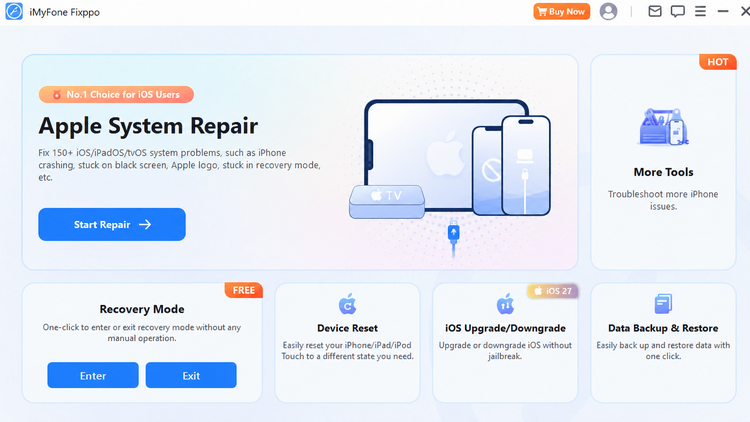
iMyFone Fixppo 9.4.3 supports iOS 27 system repair, upgrades and downgrades, data backup and restore, and recovery mode management.
The newly released Fixppo 9.4.3 helps users prepare for iOS 27, switch between iOS versions, and resolve common system problems while protecting important data.
NEW YORK, NY, UNITED STATES, September 14, 2026 /EINPresswire.com/ -- iMyFone Fixppo has officially released version 9.4.3, adding support for iOS 27 across its backup, upgrade, downgrade, and system repair features. The update gives iPhone and iPad users a single desktop solution for preparing for major system changes and addressing software problems that may appear afterward.
A January 2026 SellCell survey of 2,000 U.S. adult iPhone users found that 72% reported at least one concern or hesitation about updating to iOS 26. Battery life and performance were the leading concerns, cited by 24.2% and 23.8% of respondents, respectively. As users prepare for the next major update, they can explore iMyFone's iOS 27 solutions for upgrade, downgrade, and troubleshooting guidance.
Major iOS releases can introduce installation failures, devices stuck on the Apple logo, restart loops, black or frozen screens, recovery mode problems, and unexpected performance issues. Fixppo 9.4.3 is designed to help users manage these situations while reducing the risk of losing personal files.
Fixppo allows users to create a local backup before making significant system changes. This backup-first workflow helps protect photos, messages, contacts, and other important content before an upgrade or downgrade begins.
1.Back up important device data before changing the operating system.
2.Upgrade to iOS 27 or install a previous signed iOS version when it remains available.
3.Restore the backup after the process is complete.
Users who need to return to an earlier supported release can review the practical requirements and steps to downgrade iOS 27. Downgrade availability depends on whether Apple is still signing the target firmware version.
Fixppo supports repair for more than 150 iOS and iPadOS system issues. Standard Mode addresses common problems without erasing device data, making it suitable for users who want to preserve their current content. Advanced Mode is available for more serious software failures, although it may erase device data and should be used only after a backup has been created.
The software can identify compatible firmware automatically and guide the device through installation. This reduces the need to search for firmware files manually or use more complex recovery procedures.
"With Fixppo 9.4.3, we want users to have a more controlled way to prepare for iOS 27, protect their data, and recover from system problems if an update does not go as expected," said Lee, Product Manager at iMyFone Technology.
Teria Wang
Cleverguard Technology CO., LTD
marketing@imyfone.org
Legal Disclaimer:
EIN Presswire provides this news content "as is" without warranty of any kind. We do not accept any responsibility or liability for the accuracy, content, images, videos, licenses, completeness, legality, or reliability of the information contained in this article. If you have any complaints or copyright issues related to this article, kindly contact the author above.
